

If you’re looking for an app that helps you clean up your Mac’s storage for snappy start-up times, your search has come to an end. Freeing up GB of space is the game and BuhoCleaner plays it exceptionally well.
Use their intuitive, user-friendly UI to scan, identify, and manage user cache files, large files, apps that run on startup, and just about everything else you need to have your Mac running like it just came out of the box.
About BuhoCleaner:
BuhoCleaner is designed to help you keep your Mac clean and running smoothly. It does this by scanning the system for unnecessary files, caches, logs, and other items that take up space or slow down your computer.
Mac machines can get slow and unresponsive, sometimes due to a clogged hard drive. This issue can be fixed with a good Mac cleaner. BuhoCleaner is one of the best cleaners for Mac right now, which you can also buy the application in the device to clean the Mac at a faster pace.
Why BuhoCleaner
Some of the Quick Benefit of using the BuhoCleaner App;
- All that is required is a single tap to clean up your Mac Cache Junk.
- BuhoCleaner can also locate apps that are not useful and Uninstall such apps.
- When it comes to increasing your Mac’s speed and performance, the BuhoCleaner does a perfect job.
- Sometimes, large files are stored in your device storage, but the BuhoCleaner locates and deletes large files within seconds.
- It is built to remove Widget or files that are duplicates in your Mac device.
- Tailored Xcode Cache Cleaner, which is why millions of people download BuhoCleaner cleaning software.
Features:
Highlighted below are some of the great features that make BuhoCleaner unique when compared to their competitors in the market:
1. Mac Disk Cleanup in one tap
The software comes with simple disk cleanup features. With BuhoCleaner, you can clean your Mac easily without having to go through several duplicate features. By specializing in Disk Cleanup feature, you can clean your Mac at high speed with simple operations.

2. Complete App uninstall
If your Mac is running slowly, this problem occurs due to unnecessary cache files. BuhoCleaner can delete temporary files, app leftovers, and system cache with just one click. This feature easily cleans your Mac.

3. Remove unused applications:
The majority of Mac storage is taken up by apps. Among these apps, there are several unused apps that end up taking up a lot of space. If you manually uninstall these unused apps, the app cache may still take up space on your mac. With Dr. Buho, you can easily remove unwanted apps and their leftovers from the system cache.
4. Remove duplicate and large files:
One of the most difficult tasks is finding the large files while cleaning the Mac. BuhoCleaner can help you with the list of large files on the hard drive. You can easily select large files and delete them immediately.

Besides deleting large files, BuhoCleaner also shows duplicate files present on your hard drive by searching for identical files. You can easily select and delete duplicate files.
5. Manage startup applications:
Startup apps block the startup process on your Mac a lot. Buhocleaner scans all applications configured to start during the startup process. You can disable applications that are not required to start when you turn on the Mac. Disabling startup apps can really speed up the Mac.

6. Compatible with macOS Big Sur and Apple M1:
BuhoCleaner is optimized for the latest macOS Big Sur. It is fully compatible with safari and iMessage apps updated on macOS big on. The next updates on MacOS are also supported by Dr Buho.
With macOS Big Sur, BuhoCleaner also works perfectly on the Apple M1 processor. The software offers about 3 times faster indexing speed for all leftovers, orphans and macOS system leftovers.
7. Lifetime Updates:
The best part about BuhoCleaner is that it comes with free lifetime updates. Once you have purchased a license, you are entitled to free updates for life, including regular and major updates.
BuhoCleaner: The Pricing
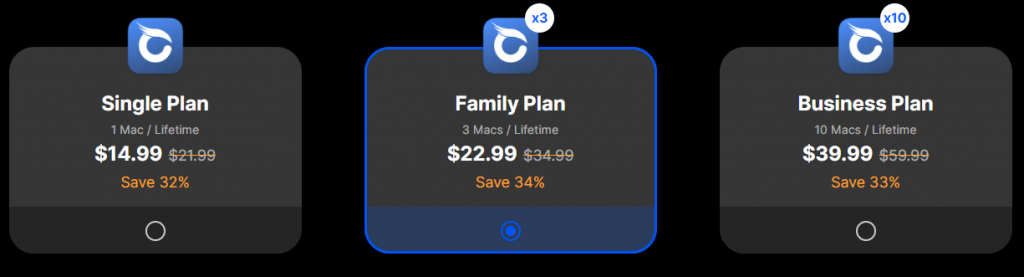
Even though you can download the software for free and have an outstanding experience, you have to unlock all the features of this tool. For that, you need to purchase the software. There are three plans available from which you can choose. These plans are:
- The single Plan is $14.99. [1 MAC per Lifetime]
- The family Plan is $12.99. [3 MACs per Lifetime]
- The business plan is $39.99. [10 MACs per Lifetime]
The image below shows the starting price for each type of plans at BuhoCleaner.
Final Recommendation:
With all of this in mind, let’s get down to the big question: “Would we recommend it?”
And the answer to this is a resounding and absolute “YES”. BuhoCleaner is a value-oriented, transparent, and highly-reputable and best Mac cleaner app.